I have been studying MPLS and though I would share some of my notes on the topic that have been useful to me. I plan to do more on the topic as time permits.
What is MPLS?
Multi-Protocol Label Switching (MPLS) is a packet-forwarding method where short fixed-length labels, rather than IP headers, are used to make forwarding decisions. When a packet enters an MPLS network, a label is pushed onto it. Every router in the core then forwards the packet purely by swapping that label for a new one, without ever looking at the IP header. When the packet exits, the label is removed and normal IP forwarding resumes.
This makes MPLS significantly more efficient than traditional IP routing in the core. An IP router needs to perform a longest-prefix match on the full routing table for every packet. An MPLS router does a single, exact lookup against a small label table.
MPLS is also technically a tunneling method. It supports multiple services over the same core infrastructure: IPv4, IPv6, Ethernet pseudowires, L2VPNs, L3VPNs, and more. That flexibility is why it became the dominant transport technology in service provider networks.
Key Terms
Label Switch Router (LSR) — Any router participating in MPLS label switching. Also called a Provider (P) router in VPN contexts.
Label Switched Path (LSP) — The end-to-end path a labelled packet follows through the MPLS network.
Customer Edge (CE) — The customer’s router. CE devices connect to the provider network but do not participate in MPLS at all — they just send and receive normal IP traffic.
Provider Edge (PE) — The provider router that sits at the boundary between the customer and the MPLS core. Only the interfaces facing the core run MPLS. PE routers push labels on ingress and pop them on egress.
Forwarding Equivalence Class (FEC)
Before a packet gets a label, MPLS needs to decide which label to give it. That decision is based on the Forwarding Equivalence Class (FEC) — a classification of packets that will be forwarded the same way. Traffic sharing a FEC gets the same label and follows the same path through the network.
Common FEC classifications include:
- Destination IP prefix (by far the most common)
- Source and destination address pair
- Layer 4 port numbers
- Protocol type
- VPN membership
Under normal MPLS LDP operation, the path a packet takes is determined by the underlying IGP, whichever path OSPF or IS-IS selects.
The MPLS Header
The MPLS label is a shim header — it sits between the Layer 2 and Layer 3 headers and is 4 bytes (32 bits) wide.
 0                   1                   2                   3
 0 1 2 3 4 5 6 7 8 9 0 1 2 3 4 5 6 7 8 9 0 1 2 3 4 5 6 7 8 9 0 1
+-+-+-+-+-+-+-+-+-+-+-+-+-+-+-+-+-+-+-+-+-+-+-+-+-+-+-+-+-+-+-+-+
|                Label (20 bits)                | EXP |S|  TTL  |
+-+-+-+-+-+-+-+-+-+-+-+-+-+-+-+-+-+-+-+-+-+-+-+-+-+-+-+-+-+-+-+-+
- Label (20 bits) — The forwarding label value. This is what routers look up in their LFIB to decide where to send the packet next.
- EXP (3 bits) — Experimental bits, used for QoS. The IP Precedence value from the inner IP header is typically copied here so P routers can apply traffic policies without inspecting the IP header.
- S (1 bit) — Bottom of Stack. MPLS supports stacking multiple labels. When this bit is
1, this is the last label in the stack. When0, there are more labels beneath it. - TTL (8 bits) — Time to Live. Decremented by one at each hop, same as IP TTL.
Label stacking is fundamental to MPLS VPN services. A packet carrying an L3VPN route, for example, carries two labels:
- Outer (transport) label — Gets the packet from ingress PE to egress PE through the core. P routers only ever look at this label and swap it hop by hop. It has no knowledge of the customer or service riding on top.
- Inner (service/VC) label — Identifies the specific VPN or pseudowire instance at the far PE. Assigned by the egress PE, signalled to the ingress PE, and never touched by P routers. Only the PE routers care about it.
LDP — Label Distribution Protocol
Labels don’t get assigned manually. Label Distribution Protocol (LDP) is the control-plane protocol that automates label discovery and distribution between routers.
How LDP Neighbours Form
- Routers send Hello packets to the multicast address
224.0.0.2(all-routers) using UDP port 646. - When a Hello is received, a TCP session is established on port 646.
- The router with the higher LDP Router ID is the active peer.
- Over that TCP session, routers exchange their label bindings.
If a neighbour is not directly adjacent, LDP can be configured for targeted LDP — a unicast TCP session to a non-adjacent peer:
R1(config)# mpls ldp neighbor 10.0.0.5 targeted ldp
Label Operations
Three things can happen to a label at any given hop:
- Push — Add a label to the packet (ingress PE, entering the MPLS domain)
- Swap — Replace the incoming label with an outgoing label (transit P routers)
- Pop — Remove the label (egress PE or penultimate hop)
Label Allocation and Distribution
Each router independently generates a local label for every prefix in its RIB — with one notable exception: BGP prefixes are not labelled by LDP. In practice, only loopback /32s of PE routers need labels; there is no need to label every customer prefix in the core. These bindings are stored in the Label Information Base (LIB).
Each router then advertises its label bindings to all LDP neighbours. After exchanging bindings, each router knows:
- The local label it advertised (the label neighbours should use when sending traffic destined for its prefixes)
- The outgoing label advertised by its next-hop (the label to use when forwarding toward a destination)
This information is used to build the Label Forwarding Information Base (LFIB) — the data-plane table that drives actual forwarding.
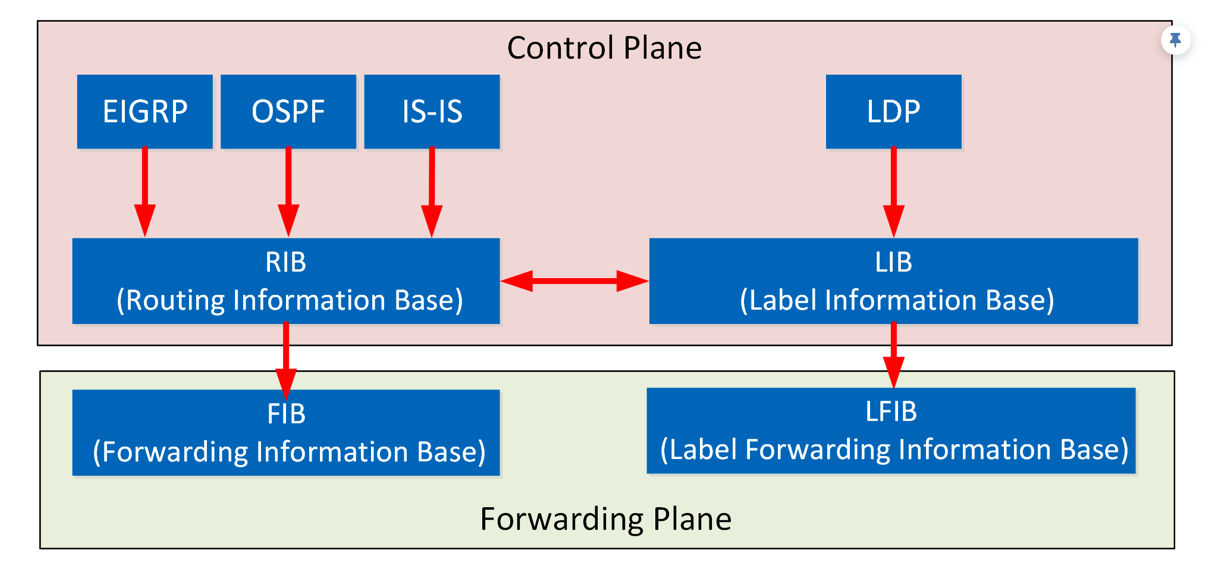
LIB (Label Information Base):
R2# show mpls ldp bindings
LFIB (Label Forwarding Information Base):
R2# show mpls forwarding-table
Penultimate Hop Popping (PHP)
The egress LSR does a label lookup and then immediately routes the packet using the IP routing table. To avoid doing two lookups on the final router, the penultimate hop (the router one hop before the egress) pops the label instead. The egress PE receives a plain IP packet and only needs to do a single IP FIB lookup. This is Penultimate Hop Popping (PHP) and is the default behaviour in most MPLS implementations.
Forwarding Behaviour
Here is how a packet actually moves through an MPLS network:
Ingress PE (Label Edge Router) Receives a plain IP packet from the CE. Performs a normal FIB lookup to determine the next hop, then pushes the label that next-hop has advertised for that destination prefix. The labelled packet is forwarded into the core.
Transit P Routers Never inspect the IP header. Each P router takes the incoming label, performs an LFIB lookup (label-in → label-out + interface), swaps the label with the downstream outgoing label, and forwards. This is the efficiency core of MPLS — the entire forwarding decision is a single exact-match table lookup.
Penultimate P Router Pops the outer label (PHP) and forwards the packet to the egress PE with just the inner service label (in a VPN scenario) or as a plain IP packet (in a simple LDP scenario).
Egress PE Receives the packet, reads the service label to identify the VPN or pseudowire instance, pops the remaining label, and forwards the plain IP packet out toward the CE.
BGP-Free Core
One of the major architectural benefits of MPLS is that P routers do not need to run BGP. In an MPLS VPN deployment, customer routes are exchanged only between PE routers using MP-BGP (Multi-Protocol BGP). The P routers in the core only run an IGP (OSPF or IS-IS) and LDP. They have no knowledge of customer prefixes at all — they just swap labels.
This is called a BGP-free core. To avoid a full BGP mesh between all PE routers, Route Reflectors (RR) can be used. The RR re-advertises VPN routes between PE routers without needing to participate in MPLS forwarding itself.
MP-BGP and VPN Concepts
When BGP carries VPN routes with label information, it’s referred to as MP-BGP. A few concepts that will come up frequently in the L3VPN and L2VPN posts:
Route Distinguisher (RD) — A 64-bit value prepended to a customer IP prefix to make it globally unique within the MPLS network. Format: ASN:NN. The RD is tied to a VRF and allows the same customer IP address space to exist in multiple VPNs without conflict.
Route Target (RT) — A 64-bit BGP extended community that controls which VRF a VPN route is imported into and exported from. Same format as RD. This is the mechanism that defines which sites belong to the same VPN.
VPNv4 Route — A customer IPv4 route with an RD prepended, carried in MP-BGP between PE routers. The RT is carried as a BGP community attribute alongside it.
Basic MPLS Configuration
Prerequisites
Underlay IGP reachability must be in place before enabling MPLS. MPLS sits on top of your existing OSPF or IS-IS ensuring Loopback reachablitiy.
Enable LDP
Set an explicit LDP Router ID (optional — defaults to the highest loopback IP):
R1(config)# mpls ldp router-id Loopback0
Enable MPLS on individual interfaces:
R1(config-if)# mpls ip
Or use OSPF/IS-IS autoconfig to enable MPLS on all interfaces in an area automatically:
R1(config)# router ospf 1
R1(config-router)# mpls ldp autoconfig area 0
Optional Tuning
Define a specific label range (best practice to avoid overlap between routers):
R1(config)# mpls label range 100 199
Enable MD5 authentication for an LDP session:
R1(config)# mpls ldp neighbor 10.0.0.2 password MySecret
Adjust MPLS MTU to account for label overhead (each label adds 4 bytes):
R1(config-if)# mpls mtu 1508
Verification
Check that LDP neighbours have formed:
R1# show mpls ldp neighbor
Check label bindings in the control plane (LIB):
R1# show mpls ldp bindings
Check the data-plane forwarding table (LFIB):
R1# show mpls forwarding-table
Check MPLS is enabled on the right interfaces:
R1# show mpls interfaces
Tracing the Label Switched Path
If you want to verify end-to-end that a prefix is getting labelled correctly, work through these commands in order:
Confirm the route is in the routing table:
R1# show ip route 10.0.0.5
Confirm LDP has a binding for it:
R1# show mpls ldp bindings 10.0.0.5 32
Confirm the CEF entry shows a label being applied on the outgoing interface:
R1# show ip cef 10.0.0.5/32 detail
That covers the core mechanics of how MPLS works. In the next posts I’ll get into how these building blocks are used to build actual VPN services — starting with L3VPNs using VRFs and MP-BGP, then L2VPNs using pseudowires and VPLS.