In this post I will be going over building a data center VXLAN fabric using GitLab for version control and continuous integration, Ansible to build and push the configuration and Arista vEOS switches. I will be building this lab in CML and will attach all of the management interfaces of the switches to a network that is reachable by the GitLab Runner. For brevity I am not going to go over how to get that connectivity configured.
It is my intention to use this lab as a base to add other technologies onto later, such as Docker, NetBox, and other advanced configurations.
Lab Overview
CML
In CML we have a pretty straightforward Spine-Leaf design. Each switch is attached to an mgmt-sw, which is connected to my home network. I’m using a VRF called mgmt on all the switches so that the management plane is kept separate from the default routing table. This is needed so the GitLab Runner has connectivity to every switch in the topology, without that reachability depending on (or interfering with) whatever the fabric itself is doing in the default VRF. Other than management, there is no further configuration on these switches, the rest is done with Ansible.
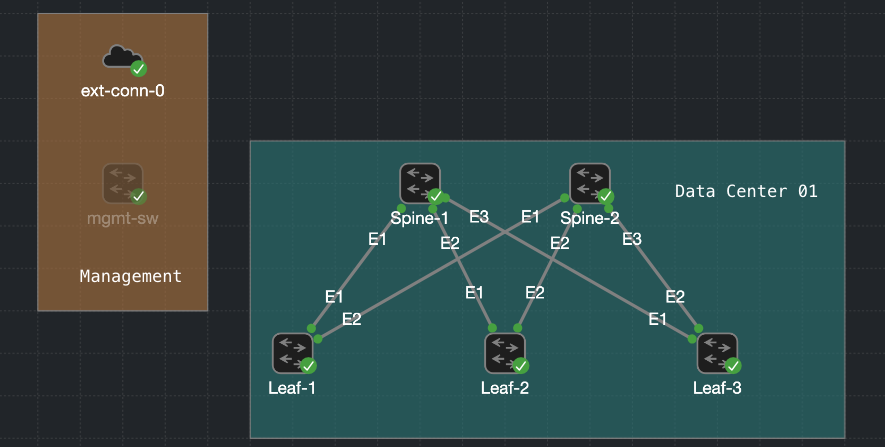
Management Interfaces
- Spine-1 =
192.168.0.41 - Spine-2 =
192.168.0.42 - Leaf-1 =
192.168.0.43 - Leaf-2 =
192.168.0.44 - Leaf-3 =
192.168.0.45
GitLab
In this lab I have GitLab installed on an Ubuntu machine called gitlab. This machine only hosts the GitLab application and the remote git repo. In addition to this, I have a GitLab Runner installed on a separate Ubuntu machine called ansible-runner. This machine exists purely to be an execution environment for GitLab and has connectivity to every device in the CML environment.
Let’s take a high-level look at the Ansible file structure and what each part is doing. I have also uploaded this project to github so that you can take a look at how Ansible is working. Here is the link to that: github.com/Michaelbecze/ansible-arista-fabric
.gitlab-ci.yml — tells the GitLab Runner what to do
inventory/fabric/hosts.yml — defines all of the devices that will be configured
inventory/fabric/group_vars/ — variables shared by every host in a group (all, spines, leaves)
inventory/fabric/host_vars/ — one file per device, for variables that only apply to that device
playbooks/ — where the Ansible plays live
roles/ — where the actual configuration logic lives, split into four roles
Our File Structure
arista-vxlan-fabric/
├── ansible.cfg
├── requirements.yml
├── .gitlab-ci.yml
├── inventory/fabric/
│   ├── hosts.yml
│   ├── group_vars/
│   │   ├── all.yml
│   │   ├── spines.yml
│   │   └── leaves.yml
│   └── host_vars/
│       ├── spine{1,2}.yml
│       └── leaf{1,2,3}.yml
├── playbooks/
│   ├── site.yml
│   ├── validate.yml
│   └── Restore-Base.yml
└── roles/
    ├── common/
    ├── underlay/
    ├── vlans/
    └── overlay/
The Arista Ansible Playbook
This is the Site.yml and that kicks the Ansible build process off as you can see it calls all of the roles that we have create.
The common and underlay role run against fabric (every spine and leaf). vlans and overlay only run against leaves, because in this design the spines are pure underlay/route-reflection, they never terminate a VXLAN tunnel.
- name: Deploy common configuration to all nodes
  hosts: fabric
  gather_facts: false
  roles:
    - role: common
      tags: common

- name: Deploy underlay to all nodes
  hosts: fabric
  gather_facts: false
  roles:
    - role: underlay
      tags: underlay

- name: Deploy VLANs and VXLAN overlay to leaves
  hosts: leaves
  gather_facts: false
  roles:
    - role: vlans
      tags: vlans
    - role: overlay
      tags: overlay
common — the housekeeping role. It pushes hostname, an NTP server, and a syslog host from group_vars/all.yml onto every node. Nothing fabric-specific happens here.
underlay — builds the point-to-point eBGP underlay that the rest of the fabric rides on.
overlay - Builds the vxlan tunnels overlay, including the vtep configuration, vni to vlan mapping and EVPN
vlans - This is a simple role that just creates vlans
How the Pipeline Works
The before_script - This tells the runner what to do before the playbook is run. Here we are just launching a virtual python environment and then installing Ansible.
default:
  before_script:
    - python3 -m venv venv
    - source venv/bin/activate
    - pip install --quiet ansible
    - pip install paramiko
    - ansible-galaxy collection install -r requirements.yml
The whole pipeline is two stages:
stages:
  - validate
  - deploy
validate runs ansible-playbook playbooks/validate.yml --check --diff — a real dry run against the actual switches, not a static lint. eos_config connects, computes what it would change, and hands that diff back as pipeline output, without pushing anything. The rules: block controls exactly when this happens: This is GitLab’s own documented pattern for avoiding duplicate pipelines: run for merge request events, skip the branch-pipeline copy of a commit that already has an open MR (so you don’t validate the same change twice).
validate:
  stage: validate
  script:
    - ansible-playbook playbooks/validate.yml --check --diff
  rules:
    - if: $CI_PIPELINE_SOURCE == "merge_request_event"
    - if: $CI_COMMIT_BRANCH && $CI_OPEN_MERGE_REQUESTS
      when: never
    - if: $CI_COMMIT_BRANCH
deploy is the only job that touches the real fabric, and it’s deliberately manual, to push this it must be done from the Gitlab GUI:
deploy:
  stage: deploy
  script:
    - ansible-playbook playbooks/site.yml
  rules:
    - if: $CI_COMMIT_BRANCH == "main"
      when: manual
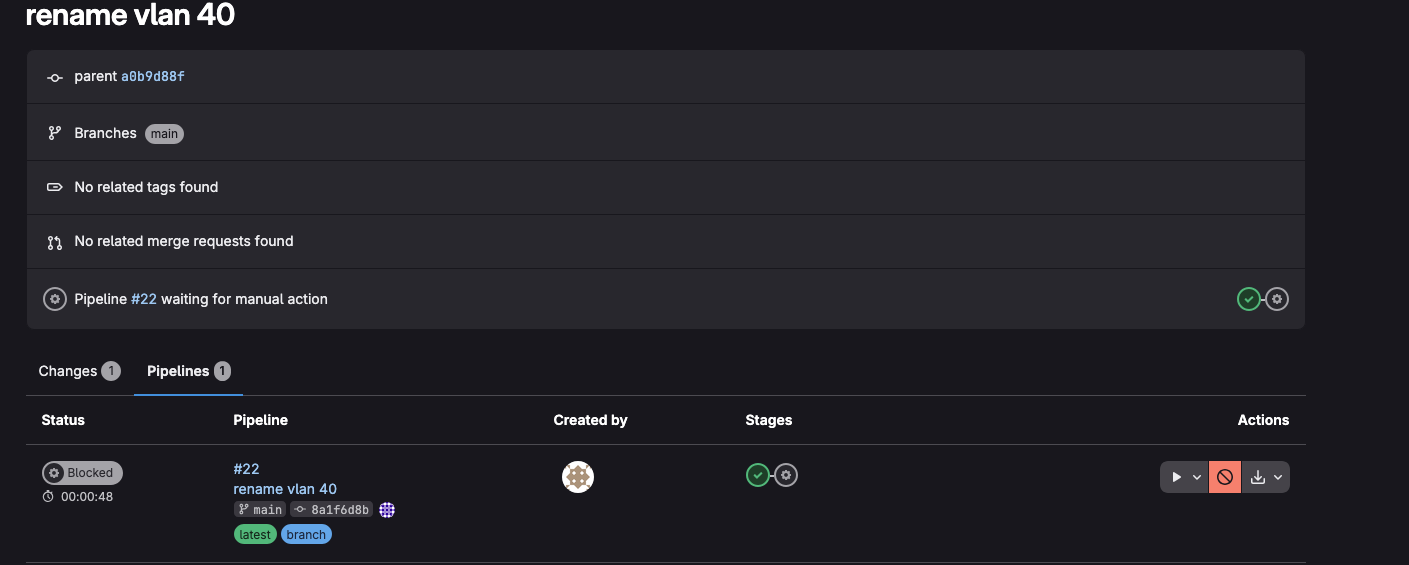
Put together: propose a change → validate shows you the real diff against real hardware on the MR → merge to main → manually trigger deploy, which applies it. It’s a small pipeline, but it maps cleanly onto “review the diff, then deploy with an undo button,” which is the actual thing you want out of network CI/CD.
Verify
First we can see from Gitlab that the playbook succeed:
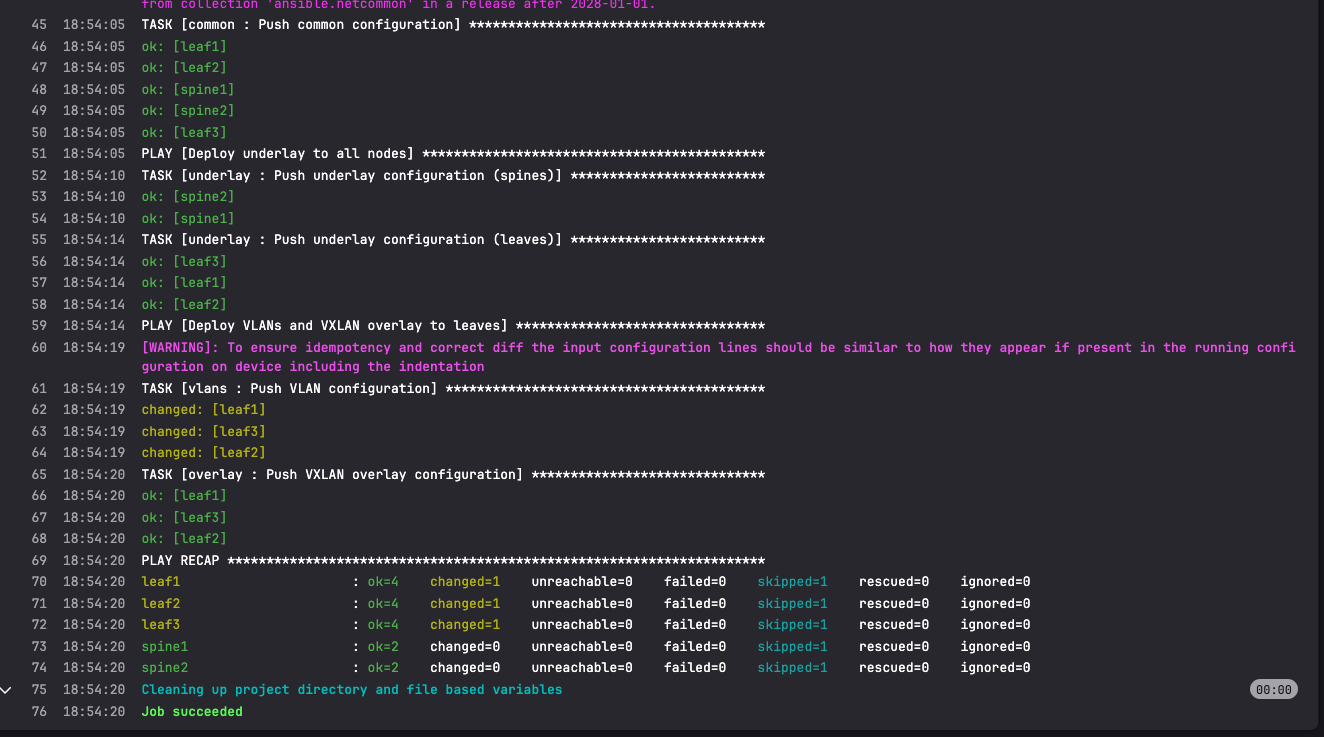
Lets go take a look at some of the switches to see if everything looks good
EVPN is up:
leaf1#show bgp evpn summary
BGP summary information for VRF default
Router identifier 10.0.0.11, local AS number 65001
Neighbor Status Codes: m - Under maintenance
  Description              Neighbor V AS           MsgRcvd   MsgSent  InQ OutQ  Up/Down State   PfxRcd PfxAcc PfxAdv
  spine1                   10.1.0.0 4 65000            117       113    0    0 01:26:47 Estab   8      8      4
  spine2                   10.1.0.6 4 65000            118       120    0    0 01:26:47 Estab   8      8      12
VXLAN Interface is UP and vlans are showing:
Vxlan1 is up, line protocol is up (connected)
  Hardware is Vxlan
  Source interface is Loopback1 and is active with 10.0.1.11
  Listening on UDP port 4789
  Replication/Flood Mode is headend with Flood List Source: EVPN
  Remote MAC learning via EVPN
  VNI mapping to VLANs
  Static VLAN to VNI mapping is
    [10, 10010]       [20, 10020]       [30, 10030]       [40, 10040]

  Note: All Dynamic VLANs used by VCS are internal VLANs.
        Use 'show vxlan vni' for details.
  Static VRF to VNI mapping is not configured
  Headend replication flood vtep list is:
    10 10.0.1.13       10.0.1.12
    20 10.0.1.13       10.0.1.12
    30 10.0.1.13       10.0.1.12
    40 10.0.1.13       10.0.1.12
  Shared Router MAC is 0000.0000.0000